
Now for the rendering of water in Outerra.
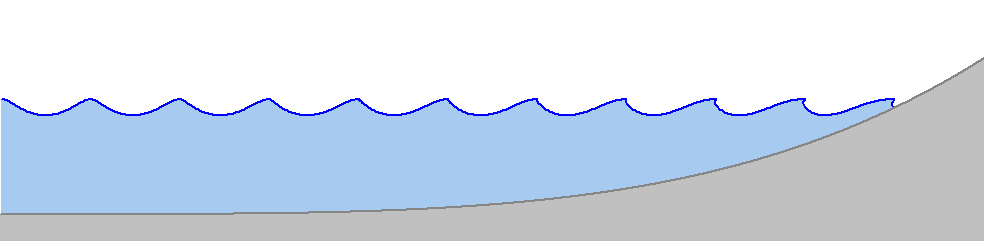
There are two types of waves mixed - open sea waves with the direction of wind (fixed for now), and shore waves (the surf) that orient themselves perpendicularly to the shore, appearing as the result of oscillating water volume that gets compressed with rising underwater terrain.
Open sea waves are simulated in a usual way by summing a bunch of trochoidal (Gerstner) waves with various frequencies over a 2D texture that is then tiled over the sea surface. Obviously, the texture should be seamlessly tileable, and that puts some constraints on possible frequencies of the waves. Basically, the wave should peak on each point of the grid. This can be satisfied by guaranteeing that the wave has an integral number of peaks in both u,v texture directions. Resulting wave frequency is then

Other wave parameters depend on the frequency (or its reciprocal, the wavelength). Generally, wave amplitude should be kept below 1/20th of wave length, as larger ones would break.
Wave speed for deep waves can be computed using the wavelength λ as:

Direction of waves can be determined by manipulating the amplitudes of generated wave, for example the directions that lie closer to the direction of wind can have larger amplitudes than the ones flowing in opposite direction. The opposite wave directions can be even suppressed completely, which may be usable e.g. for rivers.
Shore waves form as the terrain rises and water slows down, while the wave amplitude rises. These waves tend to be perpendicular to shore lines.
In order to make the beach waves we need to know the distance from particular point in water to shore. Additionally, a direction vector is needed to animate the foam.
Distance from shore is used as an argument to wave shape function, stored in a texture. This shape is again trochoidal, but to simulate a breaking wave the equation has been extended to a skewed trochodial wave by adding another parameter determining the skew. Here's how it affects the wave shape:


Several differently skewed waves are precomputed in a small helper texture, and the algorithm chooses the right one depending on water depth.
Distance map is computed for terrain tiles that contain a shore, i.e. those with maximum elevation above sea level and minimum elevation below it. Shader finds the nearest point of opposite type (above or below sea level) and outputs the distance. Resulting distance map is filtered to smooth it out.
Gradient vectors are computed by applying Sobel filter on the distance map.
 |
| Gradient field created from Gaussian filtered distance map |
Both wave types are then added together. The beach waves are conditioned using another texture with mask changing in time so that they aren't continual all around the shore.
Water color is determined by several indirect parameters, most importantly by the absorption of color components under the water. For most of the screen shots shown here it was set to values of 7/30/70m for RGB colors, respectively. These values specify the distances at which the respective light components get reduced to approximately one third of their original value.
 |  |
| Red: 7m, Green: 30m, Blue: 70m, Scattering coefficient: 0.005 | Red: 70m, Green: 30m, Blue: 7m |
Another parameter is a reflectivity coefficient that tells how much light is scattered towards the viewer. Interestingly, scattering effect in pure water is negligible in comparison with the effect of light absorption. Main contributor to the observed scattering effect is dissolved organic matter, followed by inorganic compounds. This also gives seas slightly different colors.
 |  |
| Scattering coefficient: 0.000 | Scattering coefficient: 0.020 |
Here's a short video showing it all in motion.
An earlier video that was posted on the forums with underwater scenes:
TODO
Water rendering is not yet finished, this should be considered a first version. Here's a list of things that will be enhanced:
- Better effect for wave breaking. This will probably require additional geometry, maybe a tesselation shader could be used for that.
- Animated foam
- Enhanced wave spectrum - currently the spectrum is flat, which doesn't correspond to reality. Wave frequencies could be even generated adaptively, reflecting the detail needed for the viewer.
- Fixing various errors - underwater lighting, waves against the horizon, lighting of objects on and under the water, LOD level switching ...
- Support for other types of wave breaking
- Integrating climate type support to the engine, that will allow different sea parameters across the world
- UI for setting water parameters
- Reflect the waves in physics for boats
A few of ocean sunset and underwater screenshots that were posted on the forums during the development.
 Outerra on Twitter
 Outerra on Facebook


