
This is the first of several OpenGL rendering performance tests done to determine the best strategy for rendering of various type of procedural and non-procedural content.
This particular test concerns with rendering of small procedurally generated meshes and the optimal way to render them to achieve the highest triangle throughput on different hardware.
Test setup:
- rendering a large number of individual grass blades using various rendering methods
- a single grass blade in the test is made of 7 vertices and 5 triangles
- grass is organized in tiles with 256x256 blades, making 327680 effective triangles, rendered using either:
- a single draw call rendering 327680 grass triangles at once, or
- an instanced draw call with different instance mesh sizes and corresponding number of instances, rendering the same scene
- rendering methods:
- arrays via glDrawArrays / glDrawArraysInstanced, using a triangle strip with 2 extra vertices to transition from one blade to another (except for instanced draw call with a single blade per instance)
- indexed rendering via glDrawElements / glDrawElementsInstanced, separately as a triangle strip or a triangle list, with index buffer containing indices for 1,2,4 etc up to all 65536 blades at once
- a geometry shader (GS) producing blades from point input, optionally also generating several blades in one invocation
GS performance showed up to be dependent on the number of interpolants used by the fragment shader, so we also tested a varying number of these - position of grass blades is computed from the blade coordinate within the grass tile, derived purely from gl_InstanceID and gl_VertexID values; rendering does not use any vertex attributes, it uses only small textures storing the ground and grass height, looked up using the blade coordinate
- also tested randomizing the order in which the blades are rendered in tile, it seems to boost performance on older GPUs a bit
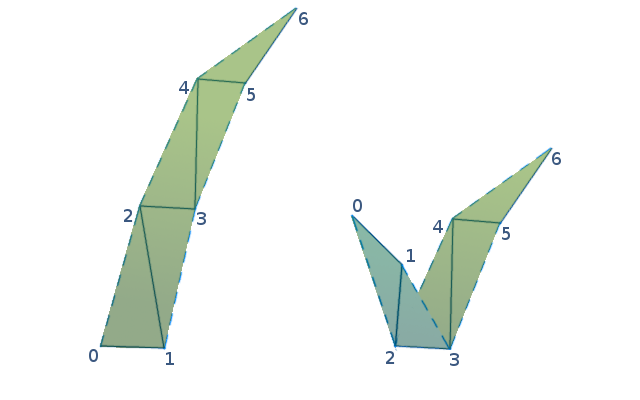
This test generates lots of geometry from little input data, which might be considered a distinctive property of procedural rendering.
Goals of the test are to determine the fastest rendering method for procedural geometry across different graphics cards and architectures, the optimal mesh size per (internal) draw call, the achievable triangle throughput and factors that affect it.
Results
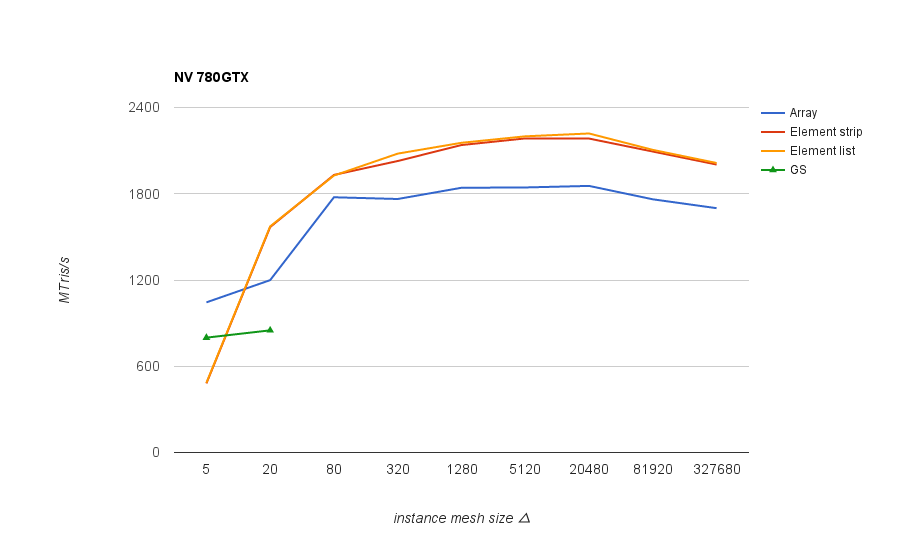
Performance results for the same scene rendered divided into varying size instances. The best results overall were obtained with indexed triangle list rendering, shown in the following graph, measured as triangle throughput at different instance mesh sizes:

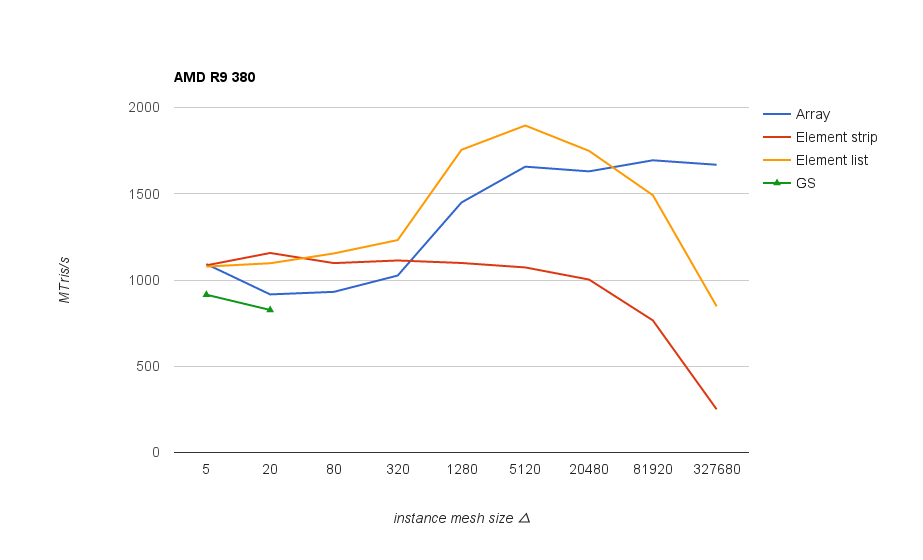
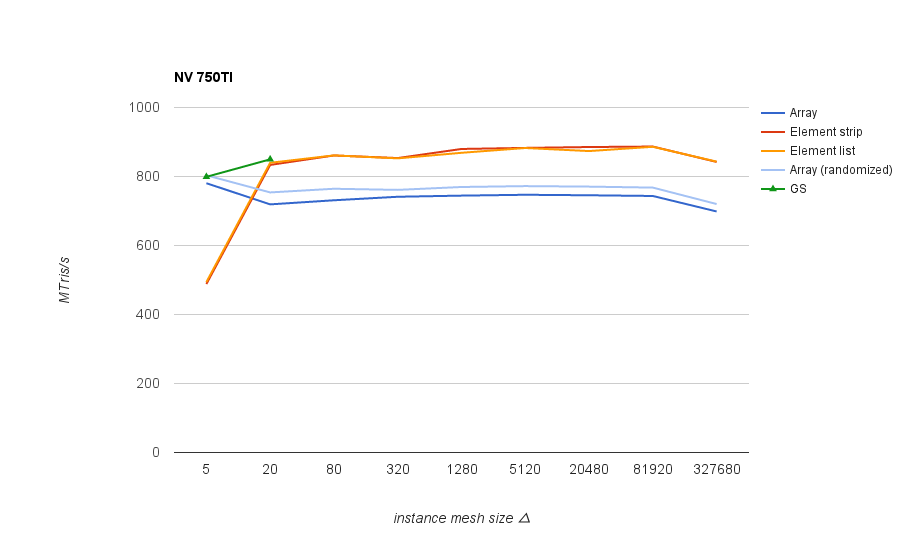
On Nvidia GPUs and on older AMD chips (1st gen GCN and earlier) it’s good to keep mesh size above 80 triangles in order not to lose performance significantly. On newer AMD chips the threshold seems to be much higher - above 1k, and after 20k the performance goes down again.
Unfortunately I haven’t got a Fury card here to test if this holds for the latest parts, but anyone can run the tests and submit the results to us (links at the end).
In any case, mesh size around 5k triangles is a good one that works well across different GPUs. Interestingly both vendors start to have issues at different ends - on Nvidia, performance drops with small meshes/lots of instances (increasing CPU side overhead), whereas AMD cards start having problem with larger meshes (but not with array rendering).
Conclusion: with small meshes, always group several instances into one draw call so that resulting effective mesh size is around 1 - 20k.
Geometry shader performance roughly corresponds to the performance of instanced vertex shader rendering with small instance mesh sizes, which in all cases lie below the peak performance. This also shows as a problem on newer AMD cards with disproportionally low performance with geometry shaders.
Note that there’s one factor that can still shift the disadvantage in some cases - the ability to implement culling as a fast discard in GS, especially in this test where lots of off-screen geometry can be discarded.
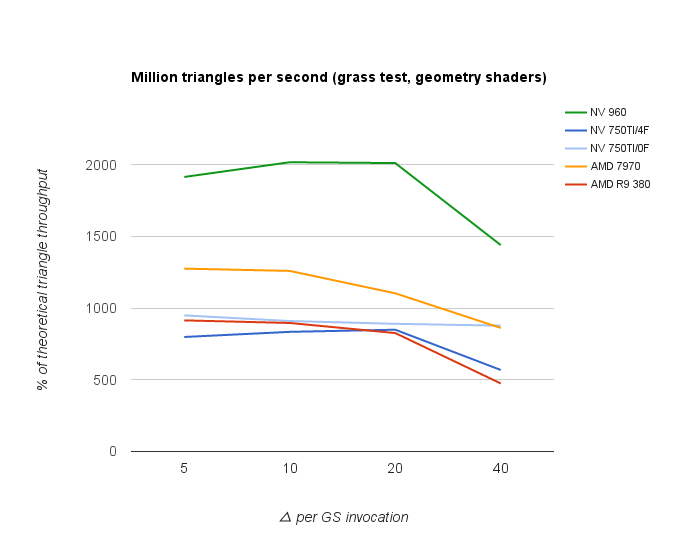
GS performance is also affected by the number of interpolants (0 or 4 floats in the graph), but mainly on Nvidia cards.
The following graph shows the performance as a percentage of given card’s theoretical peak Mtris/s performance (core clock * triangles per clock of given architecture). However, the resulting numbers for AMD cards seem to be too low.
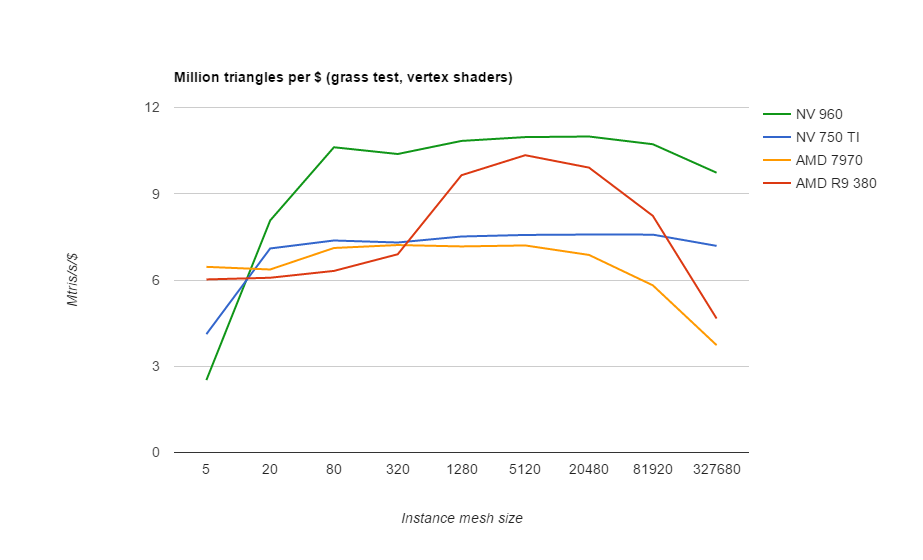
Perhaps a better comparison is the performance per dollar graph that follows after this one.

Performance per dollar, using the prices as of Dec 2015 from http://www.videocardbenchmark.net/gpu_value.html
Results for individual GPUs
Arrays are generally slower here because of 2 extra vertices needed to cross between grass blades in triangle strips, and only match the indexed rendering when using per-blade instances, where the extra vertices aren’t needed.
“Randomized” versions just reverse the bits in computed blade index to ensure that blade positions are spread. This seems to help a bit on older architectures.
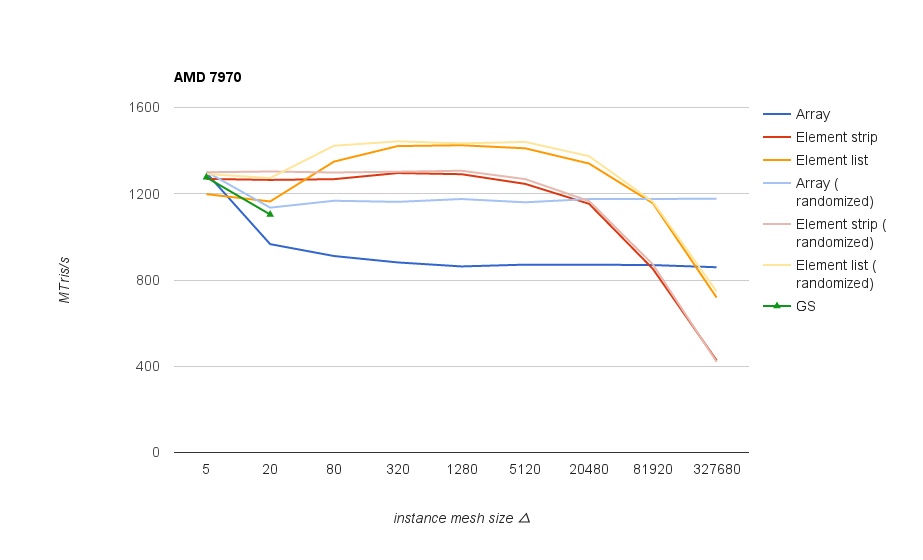
Unexpected performance drop on smaller meshes on newer AMD cards (380, 390X)
Slower rendering on Nvidia with small meshes is due to sudden CPU-side overhead.
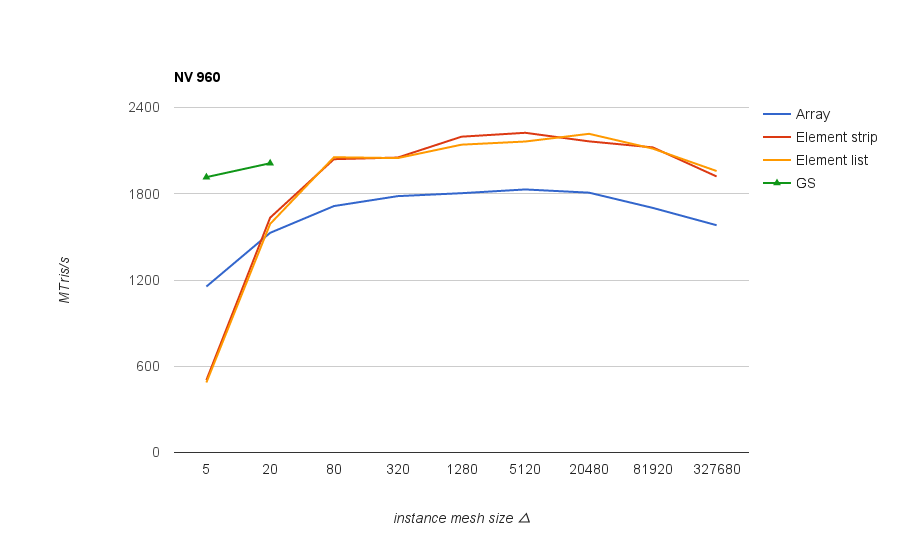
With more powerful Nvidia GPUs it’s also best to aim for meshes larger than 1k, as elsewhere minor performance bump becomes slightly more prominent:
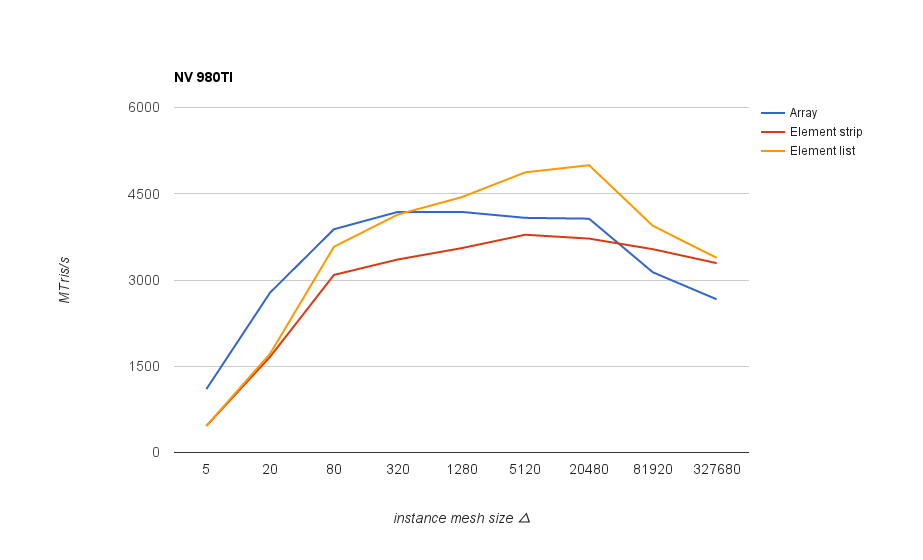
Older Nvidia GPUs show comparatively worse geometry shader performance than newer ones:


Test sources and binaries
All tests can be found at https://github.com/hrabcak/draw_call_perf
If anyone wants to contribute their benchmark results, the binaries can be downloaded from here: Download Outerra perf test
There are 3 tests: grass, buildings and cubes. The tests can be launched by running their respective bat files. Each test run lasts around 4-5 seconds, but there are many tested combinations so the total time is up to 15 minutes.
Once each test completes, you will be asked to submit the test results to us. The test results are stored in a CSV file, and include the GPU type, driver version and performance measurements.
We will be updating the graphs to fill the missing pieces.
The other two tests will be described in subsequent blog posts.
@cameni


